

React
Overview
Getting started
Structure
Entry Point
Console.log
Global Message
Polyfill
Z-Index Issue
Auth with JWT
Route Example
API Service
Store with Zustand
Form Validate
Prevent Leaving Page
App Version
useDialog
Global Loader
nextjs
Prevent Leaving Page
Overview
해당 기능은 공통업무 기능입니다. 다음과 같이 미리 준비된 Boilerplate confy-app 형태로 제공됩니다.
- next-navigation-guard 라이브러리를 사용하여 구현되어 있습니다.
Usage
1. wrapper 컴포넌트 - navigationGuardHook.tsx
'use client'

import { Button, Dialog, Flex } from '@confy-ui/react/themes'
import { useNavigationGuard } from 'next-navigation-guard'

export function NavigationGuardHook(props: {
  confirm: string
  enabled: boolean
}) {
  const navGuard = useNavigationGuard({ enabled: props.enabled })

  return (
    <Dialog.Root open={navGuard.active}>
      <Dialog.Content maxWidth='450px'>
        <Dialog.Title>화면 이동 경고</Dialog.Title>
        <Dialog.Description size='2' mb='4'>
          {props.confirm
            ? props.confirm
            : 'form 변경이 있습니다. 이동하시겠습니까?'}
        </Dialog.Description>

        <Flex gap='3' mt='4' justify='end'>
          <Dialog.Close>
            <Button variant='soft' color='gray' onClick={navGuard.reject}>
              취소
            </Button>
          </Dialog.Close>
          <Dialog.Close>
            <Button onClick={navGuard.accept}>이동</Button>
          </Dialog.Close>
        </Flex>
      </Dialog.Content>
    </Dialog.Root>
  )
}
2. 기본 사용법 예시
텍스트 입력 페이지 작성, 폼 오류 발생하고 화면 이동 하면 경고 표시
'use client'

import { NavigationGuardHook } from '@/components/navigationGuardHook'
...

const formSchema = z.object({
  username: z.string().min(4, {
    message: '네 글자 이상 적어주세요.'
  })
})

export default function App() {
  const form = useForm<z.infer<typeof formSchema>>({
    resolver: zodResolver(formSchema),
    defaultValues: {
      username: ''
    },
    mode: 'onBlur'
  })

  function onSubmit(values: z.infer<typeof formSchema>) {
    console.log(values)
  }

  return (
    <>
      <div style={{ padding: '1rem' }}>
        <Form {...form}>
          <form onSubmit={form.handleSubmit(onSubmit)}>
            <FormField
              control={form.control}
              name='username'
              render={({ field }) => (
                <FormItem>
                  <FormLabel>Username</FormLabel>
                  <FormControl>
                    <TextField.Root
                      size='1'
                      placeholder='이름을 입력해주세요. 플레이스홀더 입니다.'
                      {...field}
                    />
                  </FormControl>
                  <FormDescription>
                    이름을 입력해주세요. 설명 부분입니다.
                  </FormDescription>
                  <FormMessage />
                </FormItem>
              )}
            />
            <Button type='submit'>작성</Button>
          </form>
        </Form>
      </div>

      <NavigationGuardHook
          confirm='폼에 오류가 있습니다.'
          enabled={form.formState.isDirty}
      />
    </>
  )
}
4. 데모 예시
아래 예시는 데모 예시입니다.
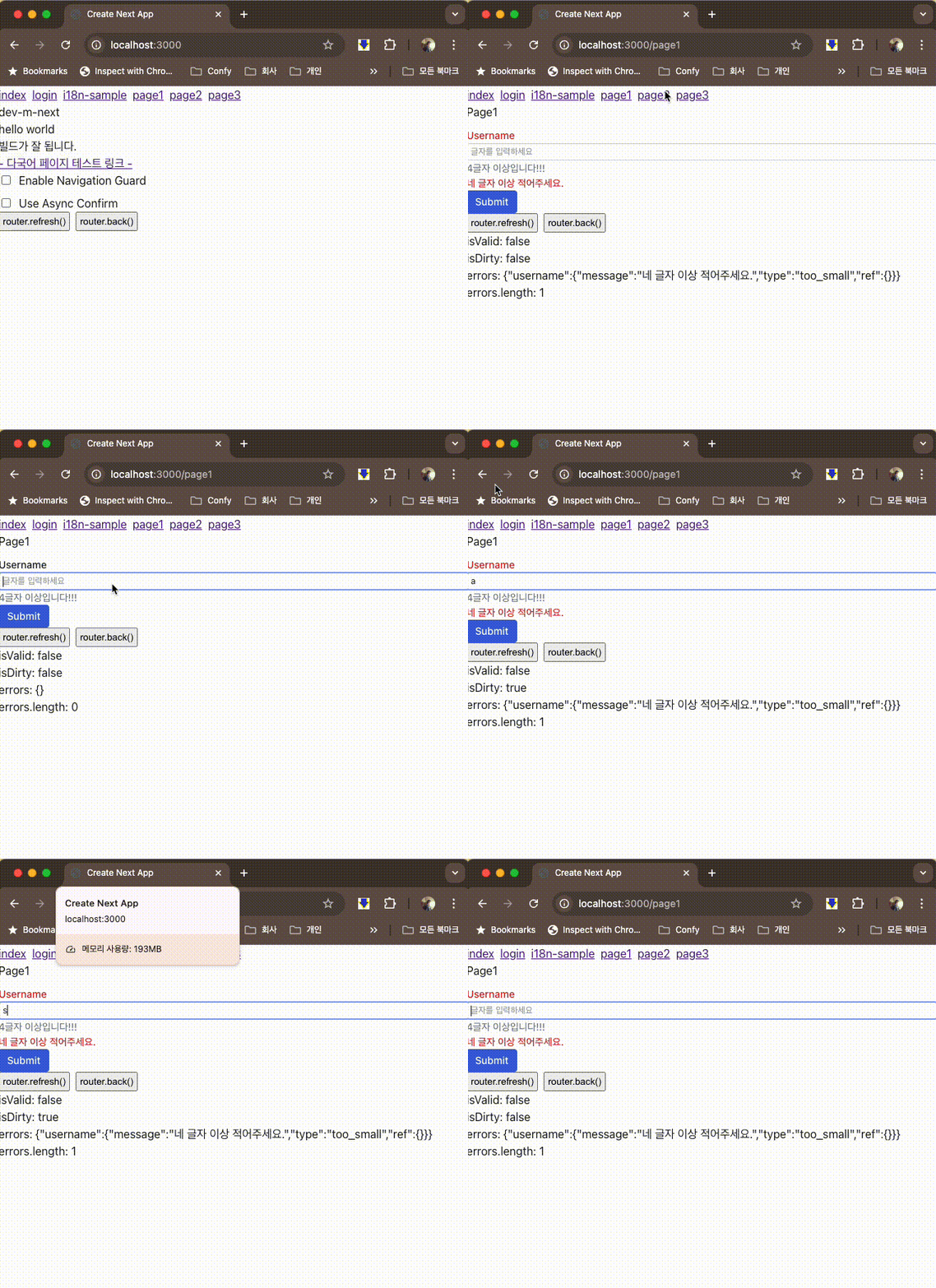
참고
PreviousPolyfill